
I got this question on my “Microsoft Planner: Send an email and create task” from Kristen McCarty (thanks for the excellent question) regarding how to generate a URL that opens the email directly on Microsoft’s Outlook. It’s not difficult, but we need to understand what’s happening so that the formula makes sense.
[su_panel text\_align="center" radius="10" background="#D6DAC2" border="1px solid #E7E7E7"]
Here's another article If you're looking for instructions on how to do this for a shared mailbox.
[/su_panel]
The expression
Let’s start with the expression to move on with your life, but if you’re curious, I will explain it in the tail in the next section.
concat(‘https://outlook.office.com/mail/inbox/id/’,replace(encodeUriComponent(triggerOutputs()?[‘body/conversationId’]),’_’,’%2B’))
So the formula uses the following functions:
We’re concatenating the URL for Office 365 Outlook’s email inbox plus the encoded ID of the message.
[su_panel text_align="center" radius="10" background="#D6DAC2" border="1px solid #E7E7E7”]Please note that this formula only works if Microsoft maintains the same structure. If something changes, Microsoft won’t keep backward compatibility or warn us, so if it doesn’t work, please let me know, and we’ll try to figure out how to create another solution[/su_panel]
Let’s look at the structure.
The overall structure
Microsoft defined the structure, so we can’t do a lot regarding that, but we can use the pieces to get to that URL.
The first part is the URL to Office 365 Office inbox. The URL is quite descriptive and indicates everything that we need to know. We want the item in the inbox with an ID.
We get this URL by opening any email on the inbox, like this:
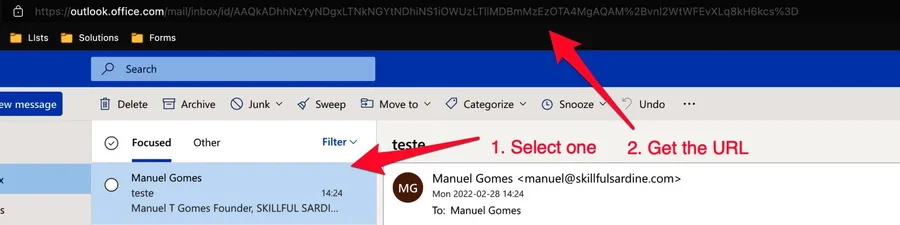
We get something like this:
https://outlook.office.com/mail/inbox/id/AAQkADhhNzYyNDgxLTNkNGYtNDhiNS1iOWUzLTllMDBmMzEzOTA4MgAQAM%2Bvnl2WtWFEvXLq8kH6kcs%3D
Let’s focus on the ID.
[su_panel text_align="center" radius="10" background="#D6DAC2" border="1px solid #E7E7E7”]Please note that this ID is exclusive to this email on my environment. If you test on your environment you’ll get different IDs.[/su_panel]
Let’s get the ID and parse it.
When we get the ID from somewhere
Using Power Automate, we can get the ID from the “When a new email arrives” trigger . In the trigger, we get the following:
{
    ...
    },
    "body": {
        "id": "AAMkADhhNzYyNDgxLTNkNGYtNDhiNS1iOWUzLTllMDBmMzEzOTA4MgBGAAAAAACvIW8tOruVQq_P-p9WUHDSBwC8MGg1BhiUTbxUOcauwKX2AAAAAAEMAAC8MGg1BhiUTbxUOcauwKX2AAKOYs4XAAA=",
        "receivedDateTime": "2022-02-28T14:24:50+00:00",
        "hasAttachments": false,
        "internetMessageId": "<3903be0c-ba36-467e-9213-93ded87daa9c@Spark>",
        "subject": "teste",
        "bodyPreview": "Manuel T Gomes\r\n\r\nFounder,\r\n\r\nSKILLFUL SARDINE",
        "importance": "normal",
        "conversationId": "AAQkADhhNzYyNDgxLTNkNGYtNDhiNS1iOWUzLTllMDBmMzEzOTA4MgAQAM_vnl2WtWFEvXLq8kH6kcs=",
        "isRead": false,
        "isHtml": true,
        "body": "<redacted>",
        "from": "manuel@skillfulsardine.com",
        "toRecipients": "manuel@manueltgomes.com",
        "attachments": []
    }
}
I redacted some parts of the reply because they don’t add much value here. Looking at the message, we see that the email has an “ID,” but not quite what we need. It doesn’t fit the ID we’re looking for:
AAQkADhhNzYyNDgxLTNkNGYtNDhiNS1iOWUzLTllMDBmMzEzOTA4MgAQAM%2Bvnl2WtWFEvXLq8kH6kcs%3D
But if we look at the “conversationId”, we can get almost what we need. We see the “%2B” and “%3D” values that compare with the original string map to the “_” and “=“ respectively.
We know how to encode these characters using the “encodeUriComponent” function. So let’s test it with a compose action.
encodeUriComponent(triggerOutputs()?['body/conversationId'])
We’ll get:
AAQkADhhNzYyNDgxLTNkNGYtNDhiNS1iOWUzLTllMDBmMzEzOTA4MgAQAM_vnl2WtWFEvXLq8kH6kcs%3D
Almost there. The ID has the underscore still not encoded. I tried with other functions, and it’s not encoded properly, so we need to do it ourselves by using the replace function. If we do:
replace(encodeUriComponent(triggerOutputs()?['body/conversationId']),'_','%2B')
We’ll get:
AAQkADhhNzYyNDgxLTNkNGYtNDhiNS1iOWUzLTllMDBmMzEzOTA4MgAQAM%2Bvnl2WtWFEvXLq8kH6kcs%3D
Does it look familiar? It’s exactly the URL that we need.
Building the URL
Finally let’s build the URL. This is the easy part since we only need to concatenate all the parts by using the concat function. Here’s the expression:
concat('https://outlook.office.com/mail/inbox/id/',replace(encodeUriComponent(triggerOutputs()?['body/conversationId']),'_','%2B'))
With this we’ll get:
https://outlook.office.com/mail/inbox/id/AAQkADhhNzYyNDgxLTNkNGYtNDhiNS1iOWUzLTllMDBmMzEzOTA4MgAQAM%2Bvnl2WtWFEvXLq8kH6kcs%3D
If you open this in your browser (with the ID generated by your email, otherwise you’ll get an error), you’ll get the email you’re looking for.
Final thoughts
The expression is simple, but it has this small gotcha that is simple once you know about it, but you can spend quite some time until you notice that the ID is not the same.
[su_panel shadow="0px 3px 10px rgba(0, 0, 0, 0.25)"] Have a suggestion of your own or disagree with something I said? Leave a comment or interact on Twitter and be sure to check out other Power Automate-related articles here. [/su_panel]
Photo by Tamanna Rumee on Unsplash



Thanks for this excellent post. I tried your solution out and I got generated a hyperlink like this: https://outlook.office.com/mail/inbox/id/AAQkAGEyMmUyZGE1LWIyMTUtNDk4ZC1hN2Q5LWZhYjFjZGYwYWQzNgAQAGtFau9OZvFPjQIU4dOvQUA%3D If I click on this hyperlink from the end user perspective the browser tries to open the deep link. However it gets a automatic redirection to https://outlook.office.com/mail/ :-( Do you experience the same issue!?
Hi André, The link's structure looks good. Notice that this will only work on your mailbox since only you have access to it. Another reason could be that the email was moved. Notice that the link contains "inbox," meaning it's located in the inbox. If it's somewhere else, then the link changes. Could it be any of these options? Cheers Manuel
My flow also redirects to the inbox in stead of the respective email. First you see the link to the email which then changes to the inbox link. Can you please help?
I finally got it to work with following hyperlink schema "https://outlook.office365.com/mail/deeplink?ItemID=" + MessageID
It seems the schema with "deeplink no longer works. Any workaorund?
Thanks, it's a great solution but I'd like to know if there's a possibility to have this link as hyperlink. For example just clickable words: Link to email. I'm trying with href but I'm getting something like this in my task : Link to email<https:\\outlook.office365.com/owa/?ItemID=AAMkADU3NmUzNjBiLTMzYWUtNGZmNS1hYmUwLWJiNTkwZDlhOGI3MABGAAAAAADV_Mdkv8BhRKOTbqUv0yP6BwBuKED0FLwpTbR8wuHYXmmPAAAAAAEMAABuKED0FLwpTbR8wuHYXmmPAAOvlZ9RAAA=&exvsurl=1&viewmodel=ReadMessageItem>
Hi! You're on the right track. You can build the HTML and then use it. The URL can be something like this: <a href="PUT THE EMAIL LINK HERE" rel="nofollow ugc">PUT THE TEXT YOU WANT TO DISPLAY HERE</a>" Would this help you? Cheers Manuel
Funny thing here... I got the original link .../inbox/id... working when adding the message id instead of the conversation id. I then send a copy to a coworker. Doesn't work in his environment. Outlook 365 opens, but the mail is not selected or opened. His mail url is much shorter than the one generated by the script. Any idea? The deeplink solution works, but just opens the complete mail in a new tab w/o the inbox displayed.
Amazing! Any luck doing this with o365 group emails? I can’t figure out but being able to generate a link to a thread would be huge.
Not yet to be honest. I need to do a bit more research and work on a demo to publish here :).
Hi, Great Tips Same question with shared mailbox https://outlook.office.com/?ItemID=[mail id]&viewmodel=ReadMessageItem&path=&exvsurl=1 Works well with a private mailbox but failed if used on a shared mailbox https://outlook.office.com/owa/sharedmailbox@mail.com/?ItemID=[mail id]&viewmodel=ReadMessageItem&path=&exvsurl=1
Can you try this? https://manueltgomes.com/microsoft/powerautomate/power-automate-common-questions/how-to-get-a-link-from-a-shared-inbox/ Just published :)
Thanks Manuel for the post. Unfortunately I am a beginner in power Automate and would need some more help. My goal is: When a email is flagged the email will be added as a planner task with all attachments: Responsible: Me Deadline: arrival of email plus one day Attachment: also attached Bucket: Task from outlook Can you help?
I got this to work for a shared mailbox. Trigger: When an email arrives in a shared mailbox (V2) Compose using dynamic content of Message Id. This feels pointless but without it I couldn’t access the Message Id in the later functions. Where you need to use the link, enter this as an expression: concat('https://outlook.office.com/mail/deeplink/read/?ItemID=', encodeUriComponent(outputs('Compose_-_Message_Id')), '&viewmodel=ReadMessageItem&path=&exvsurl=1') Make sure your Compose action is named "Compose - Message Id" or adjust the expression.
Hi Curt Is this still valid. I am having errors when I save the expression., yet I am copying it and use the same name in the compose.
Can you try this? https://manueltgomes.com/microsoft/powerautomate/power-automate-common-questions/how-to-get-a-link-from-a-shared-inbox/ Just published :)
Great post. Many thanks